We sometimes wish to extract pictures from MS Word documents and use them somewhere else. And this becomes important especially if you have deleted the original pictures you used or inserted into Word.STEP 1
We need an application called 7zip to helps extract pictures from MS Word documents. I know most of you might be familiar with this software. The software 7Zip, is not only used for archiving and compressing files, but can also be used to extracting images from MS Word documents.
Click here to download 7zip if you don’t already have.
STEP 2
After installation, just find the Ms Word document you want to extract the images from. Right click on the document and you should find the option “extract to”..” with the document’s name.
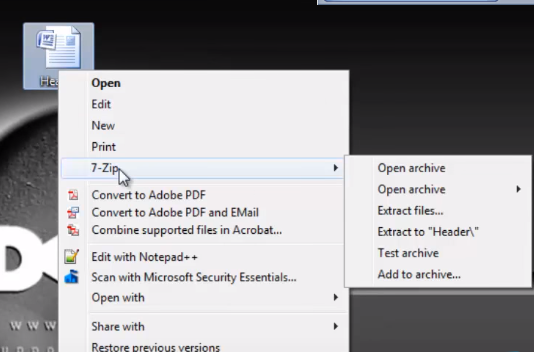
Click on that and the images will be extracted into a folder with the same name as the document and it will be placed where you have the Word document.
Read Also: HOW TO PUT A PASSWORD ON YOUR MS WORD DOCUMENTS
STEP 3
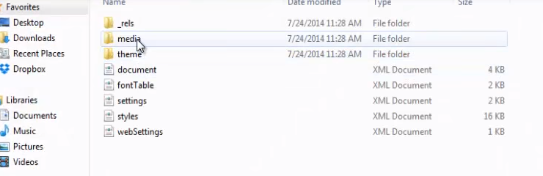
Open the folder, you will find a folder named “word” open it and find another folder named “media”. Inside the media folder, you will find the images right there.